Gemini AI Pose Change
Choose the Perfect Template for Your Pose Change
Access a curated library of pose filters designed to match fashion, fitness, and portrait photography. From casual streetwear stances to high fashion editorial shapes, find the right body language for your photo.
Natural Results with Advanced Pose Control
heyo combines advanced AI generation with simple mobile controls. The Gemini AI Pose Change feature goes beyond basic editing to understand body mechanics and lighting constraints. Upload your image and watch as the model rebuilds arms, legs, and torso positions with realistic shadows.

Full Body Reconstruction
Don't just stretch pixels. The AI understands anatomy and perspective. It generates entirely new limb positions and joint angles that match the original photo's lighting and depth of field. This results in a final image that looks like a second take from the same photoshoot.
Full Body Reconstruction
Don't just stretch pixels. The AI understands anatomy and perspective. It generates entirely new limb positions and joint angles that match the original photo's lighting and depth of field. This results in a final image that looks like a second take from the same photoshoot.
Identity Preservation
The most critical part of changing a pose is keeping the person recognizable. heyo identifies facial features, skin texture, and hair details separately from the body. This ensures the new pose looks like the same person was photographed differently, without any facial distortion or feature blending.
Identity Preservation
The most critical part of changing a pose is keeping the person recognizable. heyo identifies facial features, skin texture, and hair details separately from the body. This ensures the new pose looks like the same person was photographed differently, without any facial distortion or feature blending.

Instant Style Matching
Transform a standard standing pose into a dynamic action shot or an elegant sitting pose. The AI automatically adapts the clothing wrinkles and fabric flow to match the new position. No manual liquify tools or complex warping required.
Instant Style Matching
Transform a standard standing pose into a dynamic action shot or an elegant sitting pose. The AI automatically adapts the clothing wrinkles and fabric flow to match the new position. No manual liquify tools or complex warping required.
How to Change a Pose with Gemini AI
Master the Gemini AI Pose Change effect in just three simple steps. You don't need professional editing software or complex prompt engineering knowledge.

Step 01.
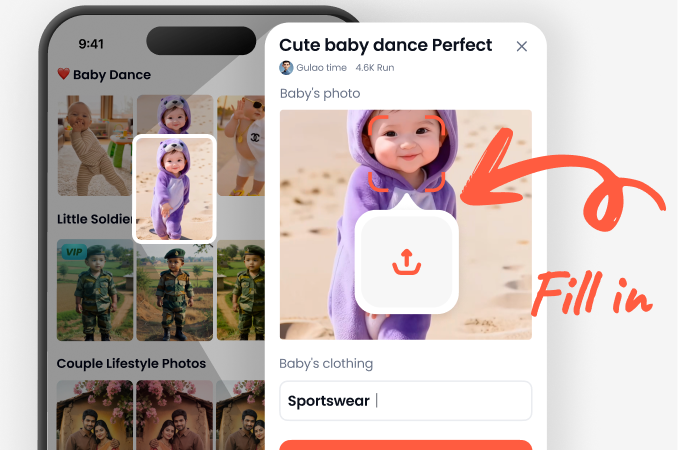
Install heyo from the Google Play Store. Open the app and upload a clear, well-lit photo where the subject is visible from head to toe or waist up.
Step 02.
Select the 'Pose Change' effect from the library. Browse the available pose templates or upload a reference image of the exact stance you want to copy.

Step 03.
Hit generate and let the AI process the image. Review the results, pick your favorite version, and save or share the new pose directly to your social media.
Explore Gemini Pose Change Results
See how different angles and postures transform the same subject. These examples showcase the versatility of the AI pose change generator, from slight adjustments to dramatic action sequences.













Why Choose heyo for AI Pose Change?
Most editing tools force you to manually warp the image, resulting in stretched backgrounds and broken anatomy. heyo uses a generative AI model that redraws the scene. It keeps every detail perfect while moving the subject. The app also offers additional video generation features if you want to animate the new pose afterward.
Why Choose heyo for AI Pose Change?
Most editing tools force you to manually warp the image, resulting in stretched backgrounds and broken anatomy. heyo uses a generative AI model that redraws the scene. It keeps every detail perfect while moving the subject. The app also offers additional video generation features if you want to animate the new pose afterward.
Popular Pose Styles You Can Generate
These are the most requested body positions for social media and professional headshots. Use these labels as inspiration for your next transformation.






Gemini AI Pose Change on Mobile
Transform your photos anywhere. The heyo app is optimized for Android devices, ensuring fast processing times and high-resolution outputs without needing a desktop computer.

Creators Love the Gemini Pose Change Effect

Derek M.
I used to shoot 100 frames just to get one good pose. Now I just shoot a basic standing photo and change the pose afterward. It saves me hours every week.
Ivy Chen
The pose change is so accurate I can create entirely new outfit posts without re-shooting. It keeps my feed looking fresh and consistent.

Marcus T.
Clients often ask 'can you make me look more relaxed?' after the shoot. With this AI I can just adjust the stance in seconds instead of scheduling a reshoot.

Sofia R.
We needed a specific dynamic pose for an ad campaign. The template matched perfectly and the final image looked like a high-end studio production.
Derek M.
I used to shoot 100 frames just to get one good pose. Now I just shoot a basic standing photo and change the pose afterward. It saves me hours every week.
Ivy Chen
The pose change is so accurate I can create entirely new outfit posts without re-shooting. It keeps my feed looking fresh and consistent.
Marcus T.
Clients often ask 'can you make me look more relaxed?' after the shoot. With this AI I can just adjust the stance in seconds instead of scheduling a reshoot.
Sofia R.
We needed a specific dynamic pose for an ad campaign. The template matched perfectly and the final image looked like a high-end studio production.
Derek M.
I used to shoot 100 frames just to get one good pose. Now I just shoot a basic standing photo and change the pose afterward. It saves me hours every week.
Ivy Chen
The pose change is so accurate I can create entirely new outfit posts without re-shooting. It keeps my feed looking fresh and consistent.
Marcus T.
Clients often ask 'can you make me look more relaxed?' after the shoot. With this AI I can just adjust the stance in seconds instead of scheduling a reshoot.
Sofia R.
We needed a specific dynamic pose for an ad campaign. The template matched perfectly and the final image looked like a high-end studio production.
Frequently Asked Questions
Learn more about the Gemini AI Pose Change effect and how to achieve the best results with heyo.
Explore More AI Photo Effects
Discover related tools and filters that pair perfectly with pose changing and advanced image editing.

Turn Selfies Into Cinematic Videos in Seconds

Change Image Color with AI in Seconds

Change Face in Seconds: AI Face Swap Made Simple
Colorize Black and White Photos Like a Pro with AI
Turn Selfies Into Cinematic Videos in Seconds
Change Image Color with AI in Seconds
Change Face in Seconds: AI Face Swap Made Simple
Colorize Black and White Photos Like a Pro with AI
Ready to Redefine Your Photos?
Download heyo now and start using the Gemini AI Pose Change effect. Turn static shots into dynamic, professional-looking images without leaving your phone.

Ready to Redefine Your Photos?
Download heyo now and start using the Gemini AI Pose Change effect. Turn static shots into dynamic, professional-looking images without leaving your phone.